Photo Limit
10 MB
QR Labels
Auto-Gen
AI Backend
Hot-Swap
Access
Tailnet
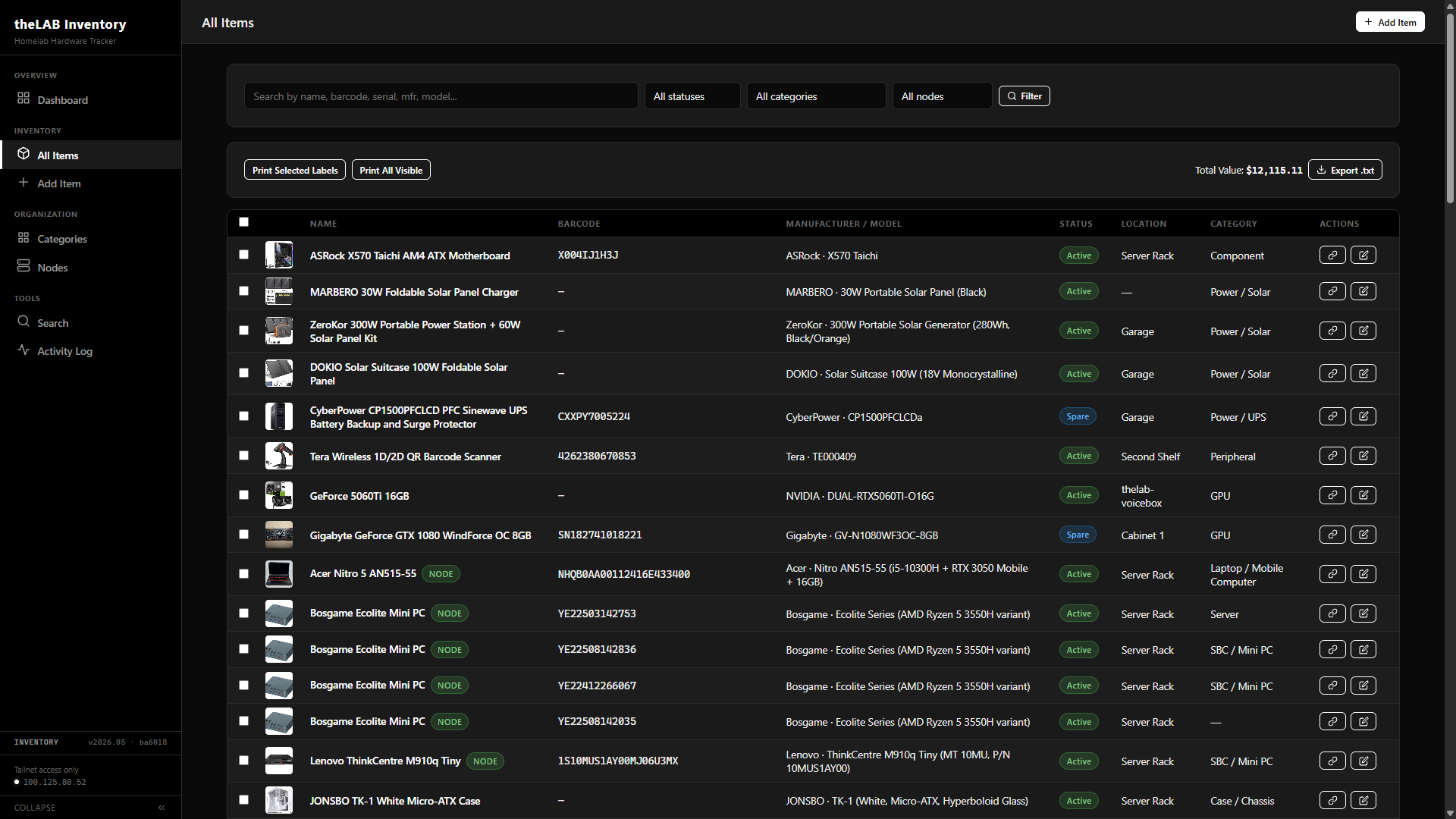 All Items view · search, filter, bulk label print, total value rollup
01 — The Problem
One Source of Truth for Every Thing in the Lab
Built to replace a sprawling spreadsheet that lost track of which CPU was in which box, what got bought when, and where the spare RAM lived. Every component, peripheral, cable, and full machine in the lab has exactly one canonical record — and a printable QR label tying it back to that record from the physical world.
QR-First
Every Item, One URL
Each item gets a unique barcode and a printable QR label that resolves to its canonical detail page. Scan in the rack, land in the catalog.
Photo Gallery
Multi-Image Per Item
Drag-and-drop upload, JPEG/PNG/WebP, 10 MB max per file. Front, back, serial sticker, install context — whatever's needed.
AI Notes
Ollama-Generated Specs
Click Generate with AI and the manufacturer/model/serial fields are sent to the configured Ollama host, which writes structured spec notes. No manual datasheet hunting.
Activity Log
Field-Level Diff
Every create, edit, photo upload, and label print is recorded with old/new values per field, a timestamp, and the source IP. The lab's own change history.
Nodes
Machines as First-Class Items
Items can flag as homelab nodes. Components installed in a node are cross-referenced — a node's detail page lists every part inside it.
Search
Cross-Field Lookup
Free-text search hits name, manufacturer, model, serial, barcode, location, and notes in one query. AJAX-backed by api/search.php for instant results as you type.
Export
CSV · Full Catalog
One-click export of the whole catalog with every metadata field for warranty audits, insurance, or jumping back to a spreadsheet view when needed.
Tailnet-Only
No Public Ingress
Apache binds to the Tailscale interface. Only authorized lab devices can reach the inventory — the wider internet never sees it.
02 — Item Detail
Per-Item Catalog Page
Each item gets its own page rendered from a single database row. Header with name and category, free-form notes, lifecycle timestamps, a printable QR label that hits the lab's thermal printer, and a photo gallery with drag-and-drop upload directly to the page.
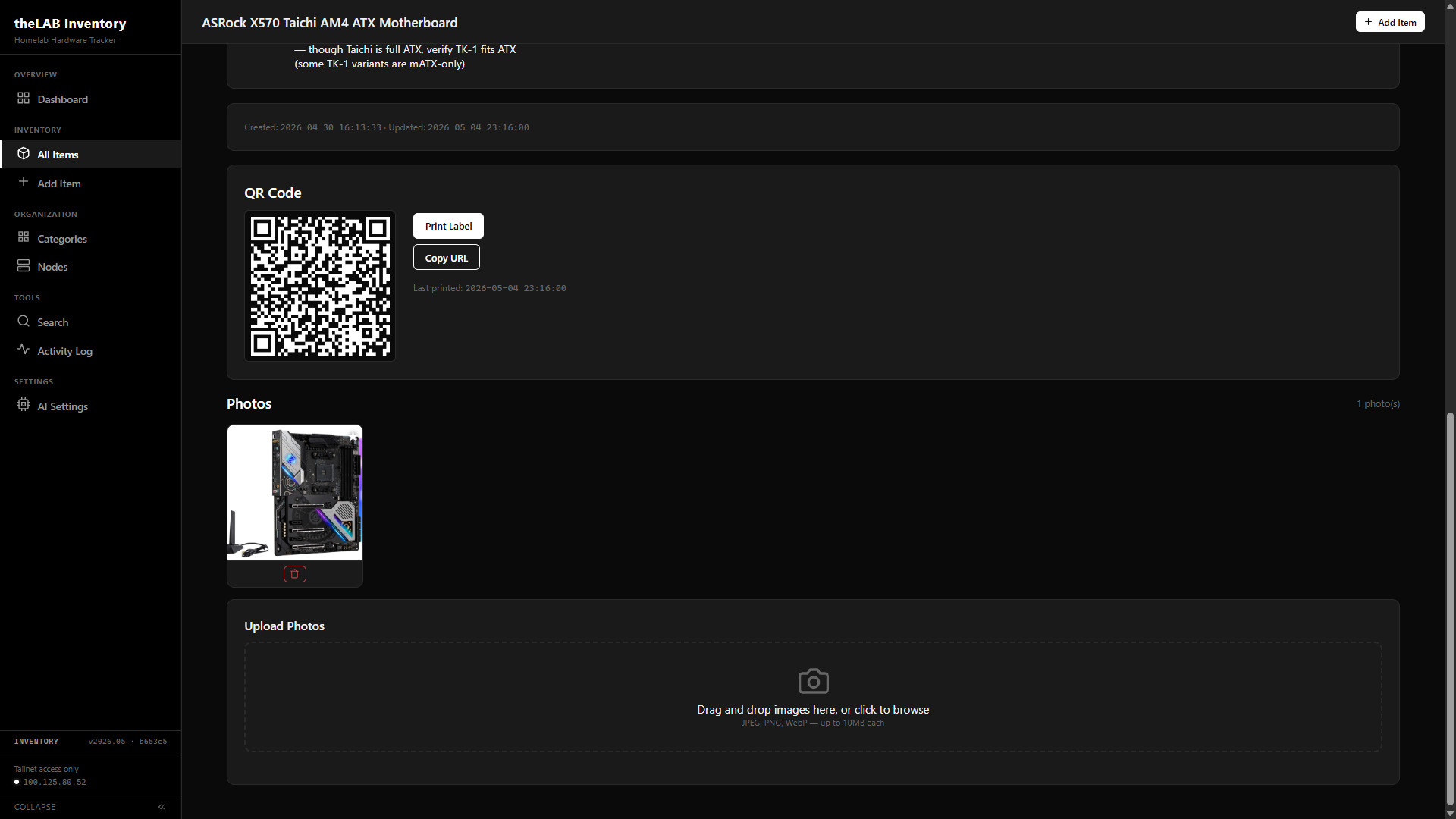 Item detail view · QR label, photo gallery, drag-and-drop upload
For batch runs, the All Items view multi-selects items and POSTs their barcodes to items/print-label.php, which lays them out on an Avery 5160 sheet — thirty labels per page, three columns by ten rows. Each label carries the QR code, item name, model line, serial number when present, and the short barcode hex. Built for laser and inkjet sheet stock; the per-item thermal label on the detail page covers single-item runs.
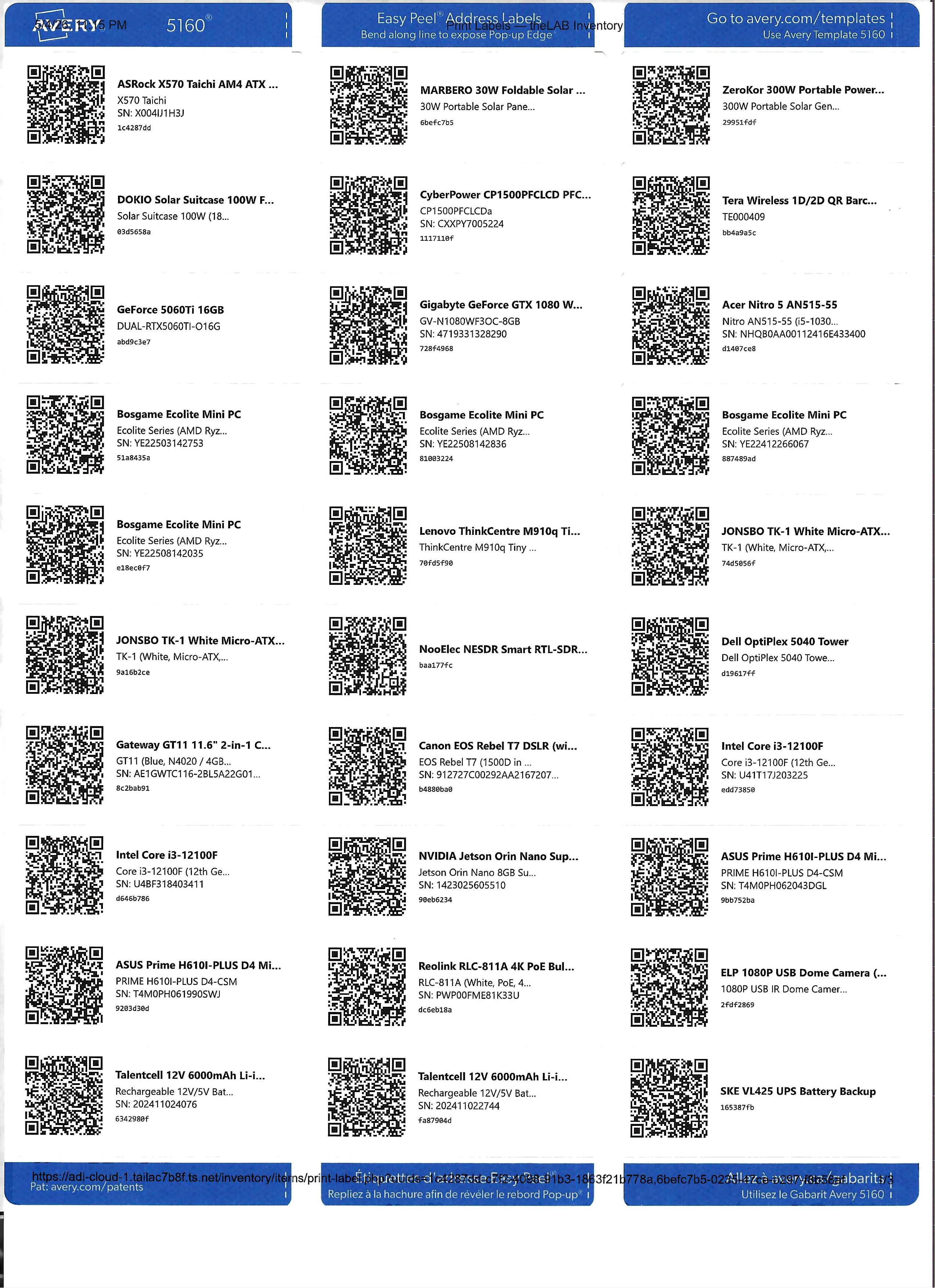 Bulk label sheet · Avery 5160 · 30 labels per page · multi-select → print → peel
03 — Edit Form
Full Metadata Schema
Every field is editable through one form. Items can flag as homelab nodes — when checked, the item is picked up by the Nodes view and cross-referenced against installed components. The Notes field accepts hand-written content or generates structured specs from the manufacturer/model fields via the configured Ollama backend.
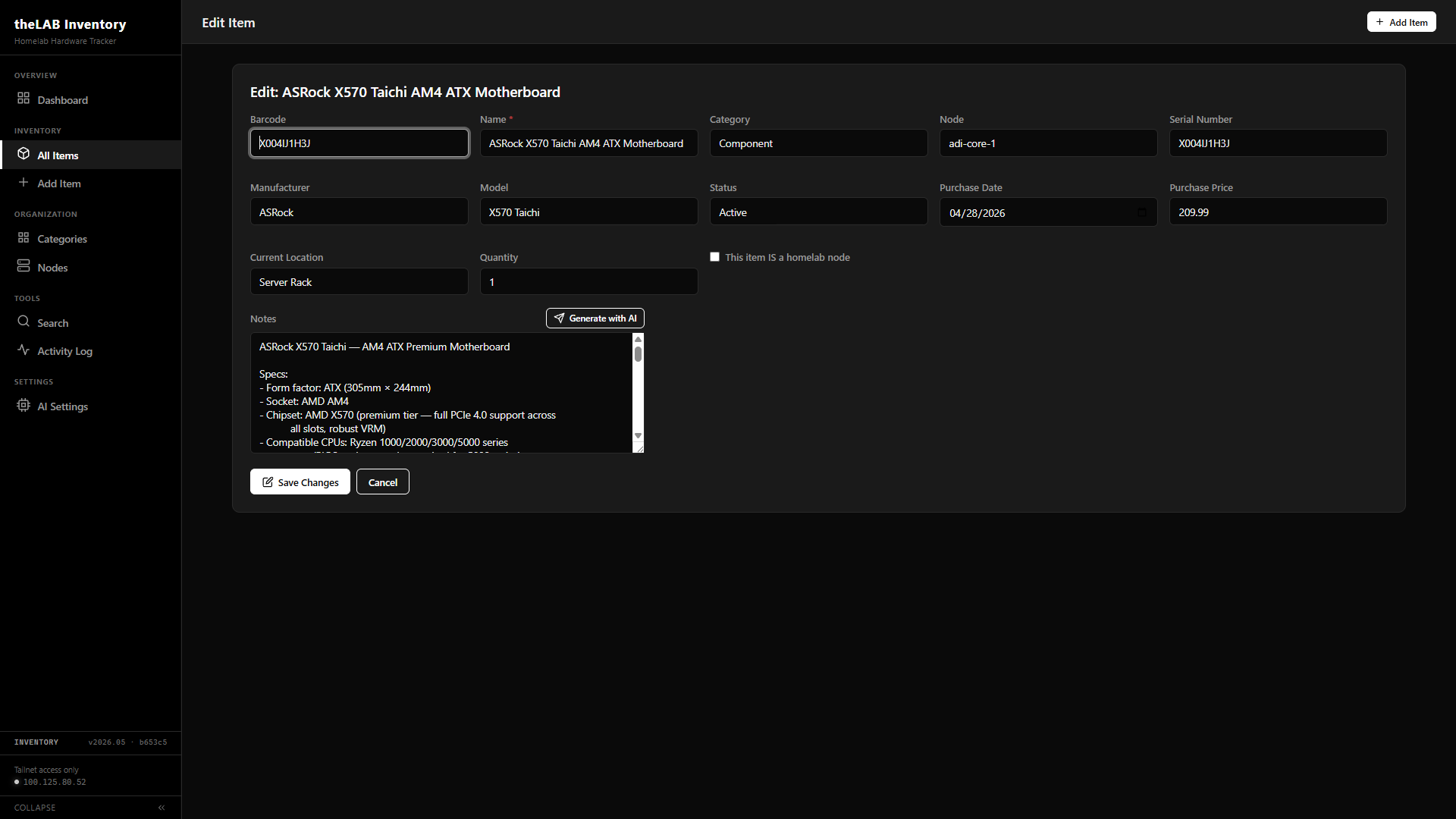 Edit form · full metadata schema with AI-powered notes generation
Identity
Barcode · Name · Serial
Barcode is the unique key — every QR label resolves to it. Name is required. Serial is free text for asset stickers and manufacturer codes.
Lifecycle
Status · Dates · Price
Four states: active, spare, decommissioned, loaned. Purchase date and price for budget tracking. Created and updated timestamps maintained automatically.
Organization
Category · Node · Location
Two-axis classification: by component type (category) and by which lab machine it lives in (node). Plus free-text location for unassigned items.
04 — Stack
What It's Built On
Procedural PHP, no frameworks, no ORM. Direct PDO against MariaDB, prepared statements throughout. A configurable Ollama backend handles the AI notes; Tailscale handles access control. Apache binds only to the Tailscale interface — nothing else.
Application
PHP 8 · Procedural
Hybrid procedural pages with shared logic in config.php, db.php, helpers.php. PDO singleton, prepared statements, no ORM.
Database
MariaDB · utf8mb4
Items, categories, nodes, photos, activity log — one schema, foreign keys throughout. Photo blobs live on disk; the DB tracks paths.
Web Server
Apache 2.4
Bound to the Tailscale interface only. PHP via libapache2-mod-php. No public listener — the inventory simply doesn't exist on the open internet.
AI Inference
Ollama · Local or Cloud
Default backend is the dual-5060 Ti box at adi-cortex over the tailnet. Model and host are runtime-configurable — swap in any Ollama tag, including :cloud tags for heavier reasoning, without touching code.
05 — Scan Workflow
One Scan, One Decision
The barcode is the single point of entry to the system. Scan it on a phone, a USB scanner at the bench, or a Bluetooth gun on the rack — api/scan.php resolves the code to either an existing item's detail page or, if no match exists, opens a fresh intake form with the barcode pre-filled and the cursor in the Name field. Two outcomes, no manual lookup.
Scan
Barcode hits api/scan.php over the tailnet. The endpoint queries by barcode and returns JSON for AJAX or a 302 redirect for direct browser navigation. The scan event is logged either way.
Land on Detail
If the barcode resolves to a live item, the user is dropped onto its view page — full metadata, photo gallery, QR label, edit button. Zero clicks between rack and record.
Pre-Filled Intake
If no match, redirect to items/create.php?barcode=.... The barcode field is locked-and-readonly so it can't be edited by accident; the cursor lands on Name. New intake is a few keystrokes from done.
06 — AI Configuration
Swap the Model Without Editing Code
A dedicated settings page at /models.php manages which Ollama host and model power the Notes generator. Hot-swap between a local model on the dual-5060 Ti box for sensitive items and a :cloud-tagged model like glm-5.1:cloud for heavier reasoning. A built-in Test Connection probe pings /api/tags on the configured host, lists every local model it serves, and surfaces broken hosts before any item ever hits the AI button.
 AI Settings · configurable host, model, and live connection probe
Storage
Flat JSON Config
Settings live in config/ai-config.json — one file, two keys, owned by www-data. Apache's .htaccess in config/ denies direct access; only PHP reads it.
Probe
Health Check Built-In
Test Connection hits /api/tags on the configured host and renders every local model the host serves. :cloud tags don't appear there — the page calls that out so you don't think it's broken.
Proxy
PHP-Side Prompt Build
The browser POSTs form fields as JSON to api/ai-notes.php. PHP composes the prompt server-side, calls Ollama's /api/generate, and returns the result — the model endpoint is never exposed to the browser.